 |
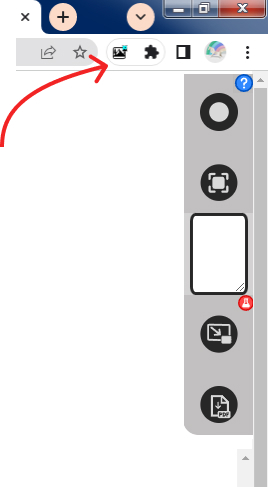
Press To Start/Stop Monitoring the Screen. |
 |
Press To Capture Screen. |
| Type Notes for the Current Screen. | |
 |
Press To View Screen in Picture-In-Picture(Small Screen) Mode. |
| Click Pause Button in Picture in Picture Screen(Small Screen) To Capture the Screen. | |
 |
Press to Download and Save the Cuptured Screens. |
| Scroll to view all pages. | |
| Press ✗ to remove the any captured page |
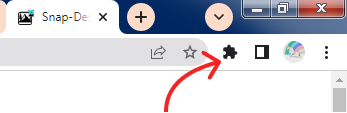
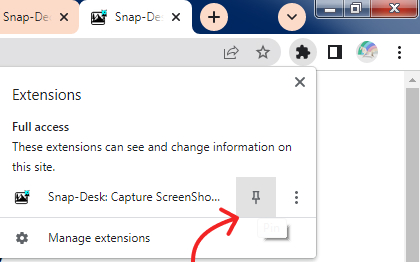
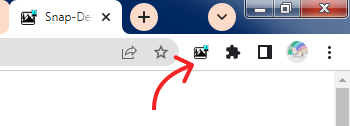
Last Updated: 2024
THE SOFTWARE IS PROVIDED "AS IS", WITHOUT WARRANTY OF ANY KIND, EXPRESS OR IMPLIED, INCLUDING BUT NOT LIMITED TO THE WARRANTIES OF MERCHANTABILITY, FITNESS FOR A PARTICULAR PURPOSE AND NONINFRINGEMENT. IN NO EVENT SHALL THE AUTHORS OR COPYRIGHT HOLDERS BE LIABLE FOR ANY CLAIM, DAMAGES OR OTHER LIABILITY, WHETHER IN AN ACTION OF CONTRACT, TORT OR OTHERWISE, ARISING FROM, OUT OF OR IN CONNECTION WITH THE SOFTWARE OR THE USE OR OTHER DEALINGS IN THE SOFTWARE.
This extension is provided on an "as is" and "as available" basis. No representations or warranties of any kind, express or implied, are made as to the operation of the extension or the information, content, materials, or products included in or accessible through the extension. You expressly agree that your use of the extension is at your sole risk.
No warranty is made that the extension will be uninterrupted, timely, secure, or error-free, or that defects will be corrected. No warranty or representation is made regarding the use or the results of the use of the extension in terms of its correctness, accuracy, reliability, or otherwise.
Last Updated: 2024
By downloading, installing, or using the Snap-Desk browser extension ("Extension"), you agree to be bound by these Terms of Use. If you do not agree to these terms, please do not use the Extension.
Snap-Desk is a browser extension that allows users to capture screenshots and save them for personal use. The Extension provides functionality for screen monitoring, capturing, and downloading screenshots in various formats.
Permission is granted to temporarily download one copy of the Extension for personal, non-commercial transitory viewing only. This is the grant of a license, not a transfer of title, and under this license you may not:
You are responsible for:
The Extension may contain intellectual property that belongs to its respective owners. Users must respect all intellectual property rights, including copyrights, trademarks, and patents, associated with the Extension and any third-party content accessed through it.
Your right to use the Extension may be terminated at any time. You may stop using the Extension at any time by uninstalling it from your browser.
These Terms may be updated from time to time. Continued use of the Extension after changes constitutes acceptance of the modified Terms.
Last Updated: 2024
This extension is designed with privacy in mind. The Extension operates locally on your device and does not transmit your screenshots or personal data to external servers. The Extension does not collect, store, or transmit:
The Extension may use your browser's local storage to save your preferences and captured screenshots temporarily on your device. This data remains on your device and is not shared with any external parties.
The Extension requires certain browser permissions to function:
These permissions are used solely for the Extension's functionality and are not used to collect or transmit your data.
The Extension may use third-party libraries for functionality. These libraries operate according to their own privacy policies. Your data is not shared with these third parties.
Since all data processing occurs locally on your device, your screenshots and notes are never transmitted over the internet. However, you are responsible for maintaining the security of your device and any downloaded files.
The Extension is not intended for use by children under the age of 13. No personal information is knowingly collected from children under 13.
This Privacy Policy may be updated from time to time. Any changes will be reflected by updating the "Last Updated" date on this page.
For questions about this Privacy Policy, please refer to the Chrome Web Store listing for contact information.